Digital interaction has changed dramatically over the past decade. Physical buttons, mechanical switches, and traditional control panels are increasingly being replaced by intuitive touchscreen interfaces. At the centre of this transformation are the Touch Panel Display and LCD Touch Screen, technologies now widely used in industrial equipment, consumer electronics, medical devices, automotive systems, retail terminals, and smart home applications.
A modern touch-enabled display does more than show information. It allows users to control equipment, enter data, navigate menus, monitor processes, and respond to alerts directly through the screen. This combination of visual communication and interactive control helps manufacturers create products that are easier to operate while reducing the number of physical components required.
What Is a Touch Panel Display?
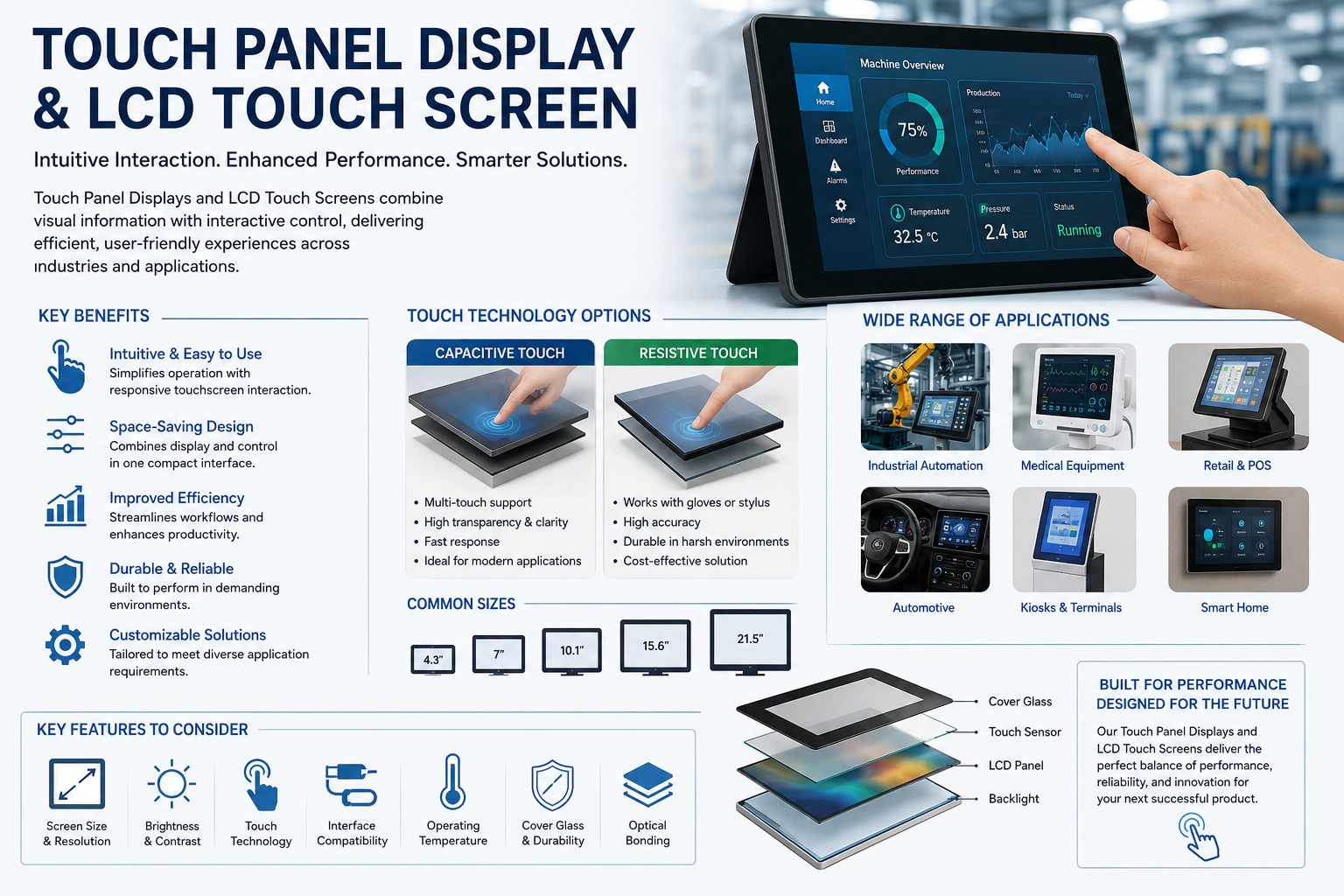
A Touch Panel Display is an electronic interface that combines a visual display with a touch-sensitive surface. Instead of controlling a device through separate buttons or a keyboard, users interact with graphical elements displayed directly on the screen.
Depending on the application, touch panels may recognise a finger, stylus, glove, or other conductive input. The touchscreen controller processes the touch coordinates and sends the corresponding command to the device’s operating system or embedded controller.
Common applications include industrial human-machine interfaces, point-of-sale terminals, information kiosks, laboratory equipment, medical monitors, automotive dashboards, vending machines, access-control systems, and home automation panels.
The biggest advantage is flexibility. Functions displayed on the interface can often be changed through software without redesigning an entire mechanical control panel.
Understanding LCD Touch Screen Technology
An LCD Touch Screen combines a liquid crystal display with touchscreen functionality. The LCD produces the visual information, while a touch sensor positioned above or integrated into the display detects user input.
LCD technology remains widely used because it offers a practical balance between image quality, availability, power efficiency, manufacturing flexibility, and cost.
Modern LCD touchscreen modules are available in many sizes and resolutions, ranging from compact displays for handheld equipment to larger industrial screens.
Important specifications commonly considered when selecting an LCD touchscreen include:
- Screen size and aspect ratio
- Display resolution and pixel density
- Brightness and contrast ratio
- Viewing angle
- Operating temperature
- Touch technology
- Interface compatibility
- Response time
- Backlight life
- Environmental protection requirements
Selecting the right configuration depends heavily on where and how the display will operate.
Capacitive vs Resistive Touch Panel Display
Two technologies dominate many touchscreen applications: projected capacitive and resistive touch.
| Feature | Capacitive Touch | Resistive Touch |
| Touch response | Highly responsive | Reliable and precise |
| Multi-touch | Usually supported | Generally limited |
| Input method | Finger or conductive stylus | Finger, glove or stylus |
| Image clarity | Excellent | Good |
| Typical use | Consumer and modern industrial devices | Industrial and specialised equipment |
| Gesture control | Excellent | Limited |
Capacitive technology is familiar to smartphone and tablet users. It supports smooth scrolling, gestures, and multi-touch operation.
Resistive technology responds to pressure and can therefore be useful in environments where operators wear gloves or use a stylus. This makes it relevant for some factories, laboratories, warehouses, and control systems.
Neither technology is universally better. The correct Touch Panel Display depends on the application’s operating environment and user requirements.
Major Advantages of LCD Touch Screen Solutions
The popularity of the LCD Touch Screen comes from its ability to combine information and control within one compact interface.
A touchscreen can replace numerous physical switches, indicators, knobs, and buttons. This enables equipment manufacturers to develop cleaner and more modern product designs.
Another advantage is contextual control. A traditional button normally performs one fixed function. A touchscreen button can change depending on the current operating mode.
For example, an industrial machine interface might display production controls during normal operation but automatically show maintenance commands when service mode is activated.
Touchscreen systems can also support multilingual interfaces, graphical instructions, real-time data, warning notifications, diagnostic information, and configurable user permissions.
Applications Across Different Industries
The flexibility of touchscreen technology allows it to serve very different industries.
In industrial automation, operators use display panels to monitor temperature, pressure, production speed, machine status, alarms, and other process variables.
Medical equipment manufacturers integrate touchscreens into diagnostic devices, patient monitoring systems, laboratory instruments, and portable healthcare equipment.
Retail environments rely on LCD Touch Screen solutions for self-service kiosks, payment terminals, digital ordering systems, ticketing machines, and interactive displays.
Automotive applications include infotainment systems, navigation units, climate controls, instrumentation, charging interfaces, and vehicle information systems.
Touchscreens are also increasingly found in smart appliances, security systems, building automation equipment, fitness devices, marine electronics, and IoT products.
How to Select the Right Touch Panel Display
Choosing a display based only on screen size can result in performance or reliability problems. Manufacturers should evaluate the complete operating environment.
Start by determining where the product will operate. An indoor consumer device has very different requirements from equipment installed outdoors or near heavy machinery.
Brightness is particularly important where sunlight or powerful artificial lighting could affect screen visibility.
Temperature tolerance should also be considered for industrial, automotive, and outdoor installations.
Touch technology must match actual users. If operators regularly wear thick gloves, a standard capacitive solution may require specialised configuration.
Engineers should also evaluate interfaces such as HDMI, LVDS, MIPI, RGB, USB, I2C, or SPI depending on the display module and system architecture.
Mechanical dimensions, mounting requirements, cover glass, optical bonding, electromagnetic compatibility, and long-term component availability may be equally important.
Role of Optical Bonding and Cover Glass
Advanced display designs often use optical bonding, where the touchscreen or protective glass is bonded directly to the display using transparent adhesive material.
Reducing the air gap between layers can help improve perceived clarity and minimise internal reflections. Bonding may also increase mechanical stability in demanding applications.
Cover glass provides another level of protection. Its thickness, surface coating, hardness, printing, shape, and treatment can be customised according to product requirements.
Anti-glare treatments may improve usability under strong lighting, while fingerprint-resistant coatings can make frequently touched consumer interfaces easier to maintain.
Factors Affecting Touchscreen Performance
Several environmental conditions can influence touchscreen behaviour.
Water droplets, electrical interference, extreme temperatures, physical contamination, vibration, gloves, and electromagnetic noise may need to be considered during product development.
For industrial applications, touchscreen controllers may require appropriate tuning to maintain reliable operation around machinery and electrical equipment.
Engineers should therefore test the complete Touch Panel Display inside the final product rather than evaluating only the display module independently.
Real-world testing can reveal issues involving enclosure design, grounding, cable routing, user behaviour, lighting, or environmental exposure.
Frequently Asked Questions
1. What is a Touch Panel Display?
It is an interactive display that detects touch input and allows users to control electronic systems directly through the screen.
2. What is an LCD Touch Screen?
It combines an LCD visual display with a touch-sensitive layer or integrated touch sensor.
3. Which touchscreen technology is most common?
Projected capacitive and resistive technologies are among the most widely used, although application requirements determine the best option.
4. Can touchscreen displays work with gloves?
Yes. Resistive screens naturally support many glove types, while specially designed capacitive systems can also support glove operation.
5. Are LCD touchscreens suitable for industrial machines?
Yes, provided appropriate brightness, temperature range, mechanical protection, touch technology, and electrical specifications are selected.
6. Can a touchscreen support multi-touch gestures?
Projected capacitive displays commonly support multi-touch functions such as pinch, zoom, and swipe.
7. What display brightness is required outdoors?
There is no universal brightness requirement. It depends on ambient lighting, optical construction, reflections, enclosure design, and viewing conditions.
8. What is optical bonding?
Optical bonding joins display layers using transparent bonding material to reduce internal air gaps and potentially improve visual performance.
9. Can the cover glass be customised?
Yes. Depending on the manufacturer, dimensions, thickness, printing, surface treatment, shape, and other properties may be customisable.
10. How do I choose the correct LCD touchscreen?
Consider screen dimensions, resolution, brightness, operating temperature, interface, touch method, environmental exposure, lifecycle requirements, and application conditions.